 Registrator Registrator
 Traveller registration · SES.HOSPEDAJES · Mossos d'Esquadra
Share a link, your guests fill in their details from their phone and Registrator reports each record to SES automatically through the Ministry's official web service. In Catalonia, to the Mossos d'Esquadra. No paperwork, no file uploads, no typing data by hand. Made for non-professional hosts: private individuals with one or a few properties, not chains or property managers.
10-day free trial · Automatic SES and Mossos submission · Multi-property · Multi-language

Three steps and your reports send themselves.
Register each property once with its province and its official SES establishment code (in Catalonia, the Mossos identifier). Each property gets its own unique check-in link.
Every property has its own link: copy it from the panel and send it to your guests via WhatsApp or email. Each one fills in their details from their phone, in their language.
The moment your guest completes check-in, Registrator reports it to SES through the official web service. You see the result of every submission in your panel. Prefer doing it yourself? You can still download the file and upload it to the portal.
Automatic submission uses credentials issued by the Ministry itself. You request them once, they're free, and you get them in three steps:
All you need: a Spanish digital certificate or Cl@ve, and your property registered as accommodation.
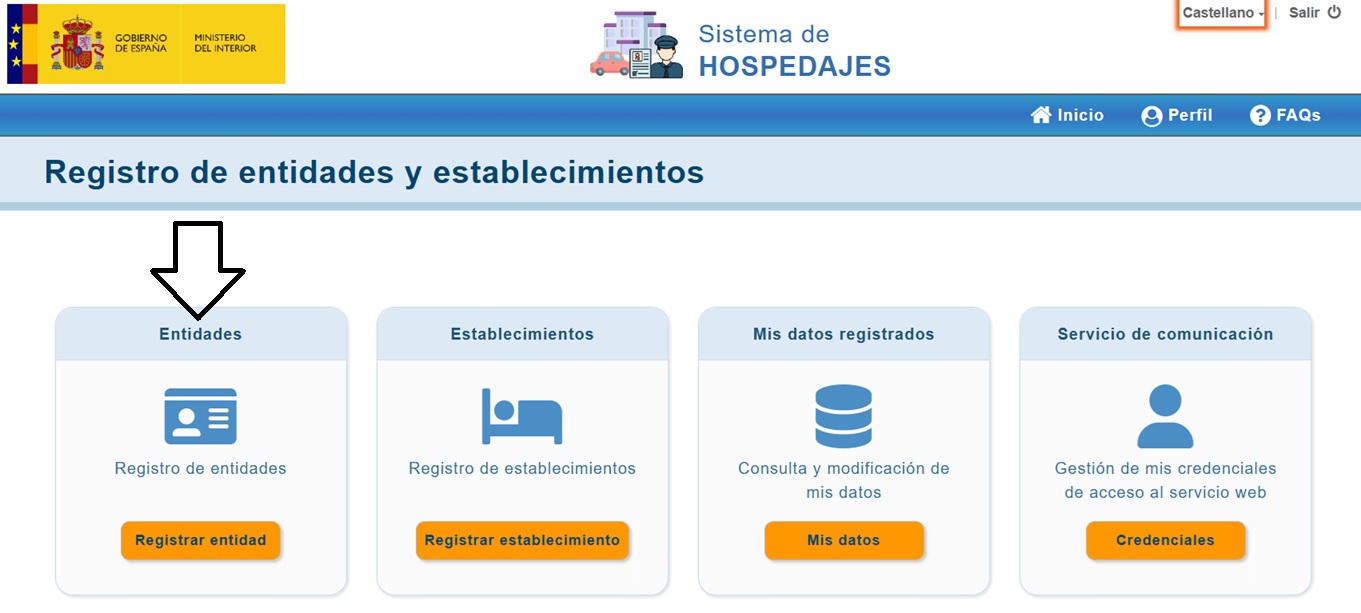
In the Hospedajes registry at the Ministry's online office, with your digital certificate or Cl@ve, click “Registrar entidad” and register your entity and your establishment: that's where you get your landlord code (código de arrendador) and the establishment code.
While registering the entity, enable that checkbox and enter an email address where validation-error notices will be sent.
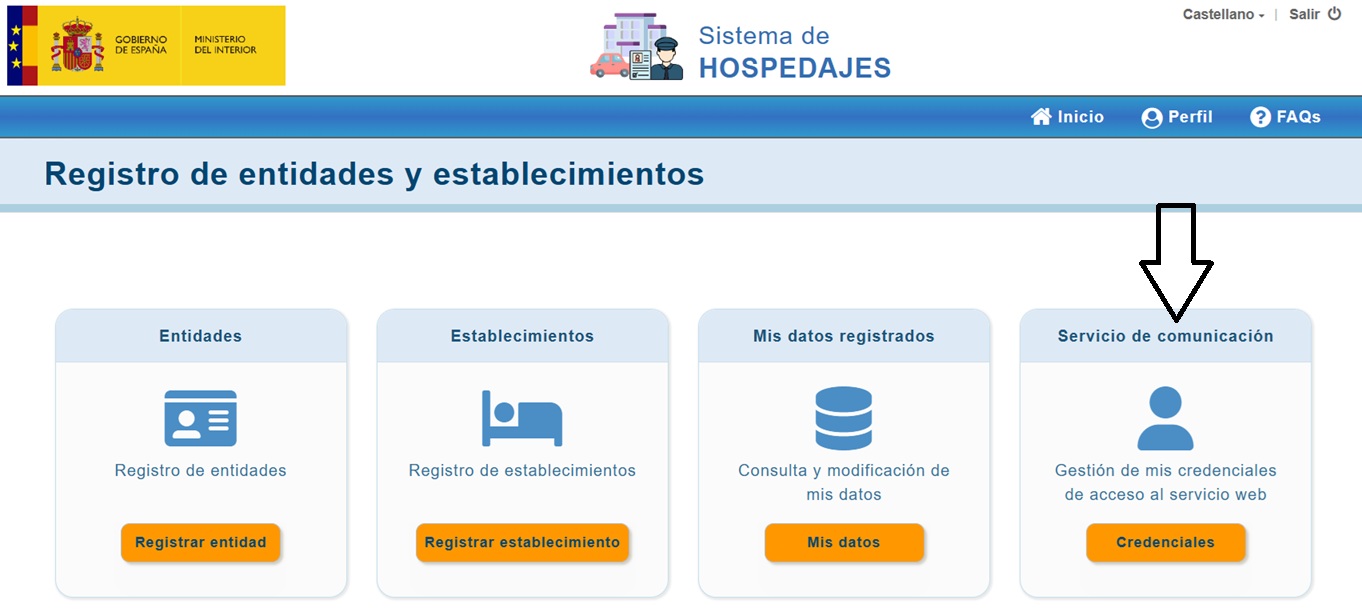
On the registry's main screen, click the “Credenciales” button on the “Gestión de mis credenciales de acceso al servicio web” card.
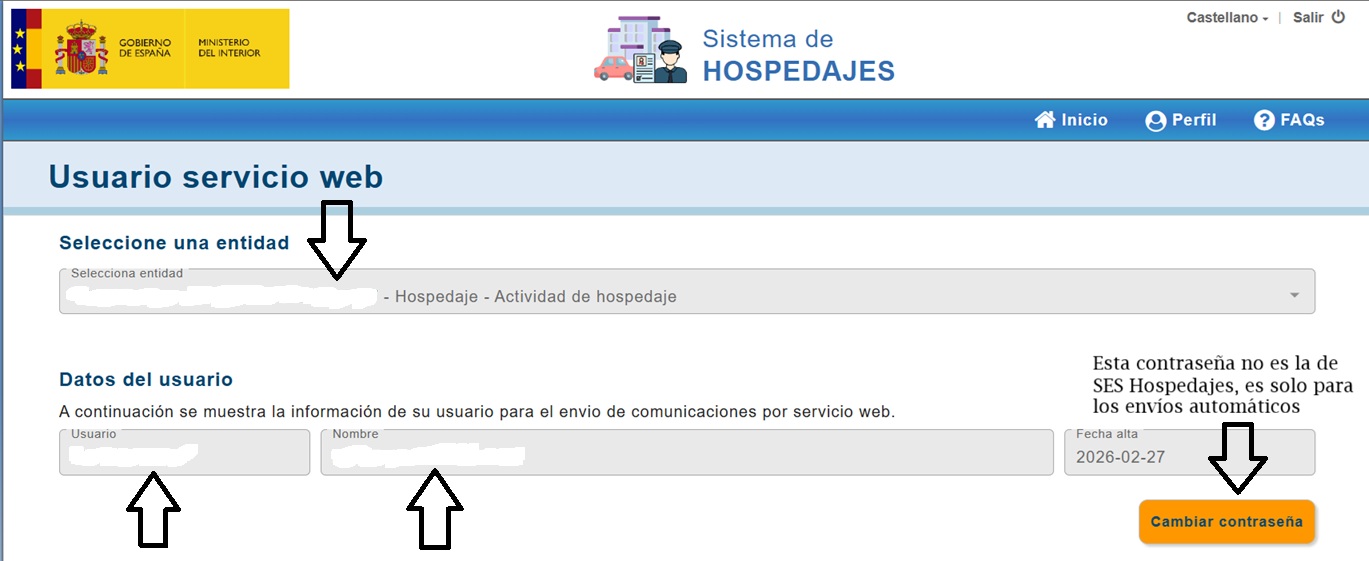
Select your entity and you'll see your web-service user. With “Cambiar contraseña” you create the password (it's not your SES.Hospedajes password: it's only for automatic submissions).
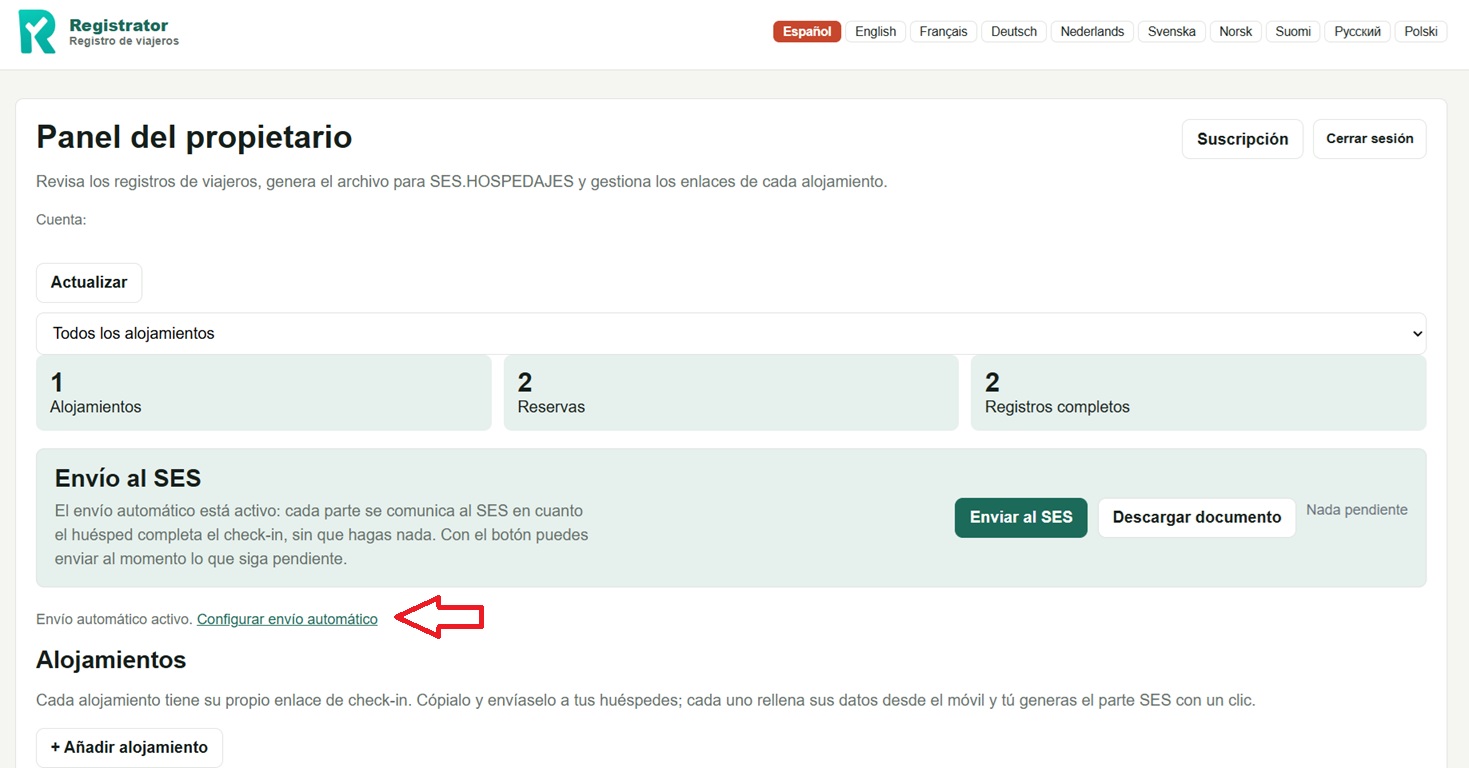
In your Registrator panel, click “Configure automatic submission”, just below the “SES submission” block.
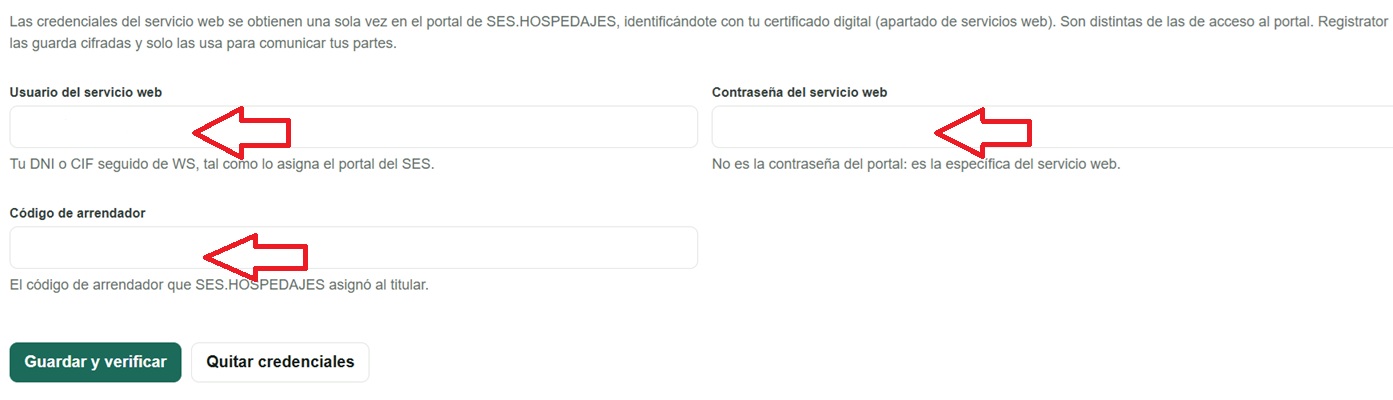
Enter the web-service user, its password and your landlord code, then click “Save and verify”. They're checked against SES and stored encrypted: you'll never have to type them again.

Don't have the keys yet? Registrator still works: download the partes file from your panel and upload it to the official portal yourself.
If you don't switch on automatic submission (or the SES service is down), Registrator gives you the file ready for the official portal.
It's the same file you download from your Registrator panel. You can upload several reports at once: the portal processes them together and warns you if any data is wrong.
Each record is reported to SES.HOSPEDAJES the moment the guest completes check-in, with the result visible in your panel.
If your property is in Catalonia, reports don't go to SES but to the Mossos d'Esquadra: Registrator sends them to their website with your property's user, or gives you the file ready to upload.
Manage all your properties from a single panel, each with its own link.
The guest form in Spanish, English, French, German and more.
See which reports are pending and which you've already sent. No duplicates.
Automatically resolves the municipality's INE code from the name and postcode.
Your guests' information travels encrypted and is stored protected.
The form validates every field: it can't be submitted empty or with data that doesn't fit. So the report reaches SES right the first time, no rejections.
If a guest cancels the booking after check-in, you cancel their record in SES from the panel in one click. No need to enter the portal.
Save your key safe code in the panel and the guest receives it by email the day before arrival, along with the apartment location (floor, door number, block...) so they know which door it is. If they reply, the email goes straight to you.
10-day free trial. No commitment. Cancel whenever you want.
Other services charge per booking (credits) and advertise 0,95 €. But that price only exists if you buy 100 at once: buying a little, you pay 1,20–1,50 € per booking. With Registrator you pay a flat fee with unlimited bookings.
| Per year, with 1 property | Pay per booking | Registrator |
|---|---|---|
| 20 bookings | ~30 € | 29,99 € |
| 30 bookings | ~40–45 € | 29,99 € |
| 45 bookings | ~55–65 € | 29,99 € |
If you rent regularly (from about 20 bookings a year), the flat plan works out cheaper — and you never run out of reports in high season. VAT included, no commitment.
This is what sets us apart from the alternatives.
Your guest photographs their ID or passport and the fields fill themselves in, with the data validated instantly. Unlimited, at no extra cost. The photo is processed on their phone and never stored.
Others “generate the file” and leave the paperwork to you. Registrator reports every parte to SES through the Ministry's official web service as soon as the guest finishes, and shows you the result of each submission.
No credits, no paying per parte: one fixed fee and all the submissions you need, even in high season.
A link or a QR code. Guests fill in from their browser, in their language (9 available), and you get an email alert with every check-in.
We're not a property-management suite for hotel chains: Registrator does one thing and does it well, with a panel you understand at first glance.
Start today and forget about copying traveller data by hand.
Get started